
Summary
We use a real customer alert, 25 failed logons followed by a successful one, to show why Windows Event ID 4625 is one of the most misunderstood events in the Security log. The post explains what the event records, which fields reveal the cause (Logon Type, Status, SubStatus, authentication package and source), and why machine-speed timing usually points to a background process holding an old password. It covers the common culprits after a password change, how attackers can hide in the same pattern, and why suppressing 4625 at ingestion creates visibility and compliance gaps. It closes with an enrichment and automated triage approach that keeps the audit trail intact.
Windows Event ID 4625: “Failed Logons” And What They Mean
By Isabella Sparks, SOC Analyst
Security analysts quickly learn that not every authentication failure is a security incident. One of the most common examples is Windows Security Event ID 4625, which records a failed logon attempt. While this event is frequently associated with password spraying, brute-force attacks, and compromised accounts, it is equally common for Event ID 4625 to be generated by entirely legitimate background processes.
This distinction matters because many SIEM detections are designed to identify patterns such as:
- Multiple failed logons in a short period
- Numerous failures followed by a successful authentication
- Repeated failures from a single endpoint against a single account
These patterns can absolutely indicate a brute-force attack. They can also represent normal Windows behaviour.
In this article, we’ll explore how Event ID 4625 works, why legitimate processes can generate dozens of authentication failures within seconds, and how analysts can distinguish between malicious and benign activity.
Note: All screenshots and data shown in this article use fictitious information created solely for illustrative purposes.
What is Event ID 4625?
Microsoft Event ID 4625 is logged whenever an account fails authentication during a logon attempt.
A common question from users and administrators is “There are 26 Event 4625 logs. Does that mean the user entered their password incorrectly 26 times?” The answer is not necessarily.
Each Event ID 4625 represents an authentication attempt, but it does not tell us whether a human physically typed credentials into a login screen.
Many authentication attempts are performed automatically by:
- Windows services
- Scheduled tasks
- Applications
- Mapped network drives
- Cached credentials
- Legacy software integrations
- Network shares
- Background processes
In these scenarios, the account owner may not even be actively using the system when the events occur.
A Real-World Example
A customer recently raised a query regarding an alert that was generated after:
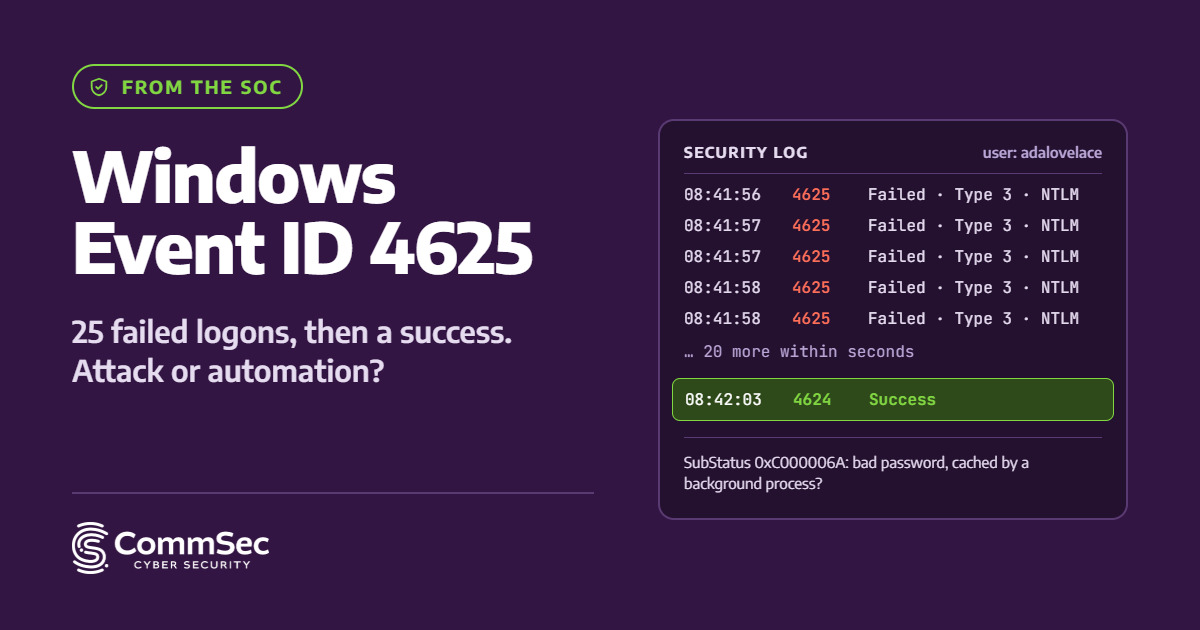
- 25 failed logon events occurred within seconds
- A 26th authentication attempt succeeded
- The activity triggered a brute-force detection rule in the SIEM
At first glance, the sequence looked suspicious.
Many detections are built around a simple pattern:
Failure
Failure
Failure
Failure
…
Failure
Success
Which naturally resembles:
Wrong password entered repeatedly
Correct password entered
However, after investigation, the activity was determined to be benign.
The authentication attempts:
- Originated from the user’s known workstation
- Targeted the user’s own account
- Occurred within seconds of each other
- Used characteristics consistent with automated authentication
The pattern was ultimately attributed to a legitimate background process rather than a person attempting to log on.
Looking Beyond the Event Count
One of the most important lessons for analysts is that the number of Event ID 4625 records only tells you how many authentication attempts occurred.
It does not tell you:
- Who initiated them
- Whether a user was present
- Whether credentials were typed manually
- Whether the activity was malicious
Twenty-five failures followed by one success simply means twenty-six authentication attempts occurred. Understanding why they occurred requires deeper investigation.
The Clues Hidden in Event 4625
The reason for the authentication failure can often be determined by examining fields such as:
- Failure Reason
- Status
- SubStatus
- Logon Type
- Authentication Package
- Workstation Name
- Source Network Address
In the example below, several values provide useful context:
“AuthenticationPackageName”: “NTLM”,
“LogonProcessName”: “NtLmSsp”,
“LogonType”: “3”,
“Status”: “0xc000006d”,
“SubStatus”: “0xc000006a”
Logon Type 3 – Network Logon
One particularly useful indicator is:
LogonType: 3
A Logon Type 3 event represents a network logon.
This often occurs when:
- Accessing a file share
- Connecting to a remote resource
- Using a mapped drive
- Authenticating to a service
- Running an application that accesses network resources
This differs significantly from a user sitting at a workstation and logging in interactively.
Status and SubStatus Codes
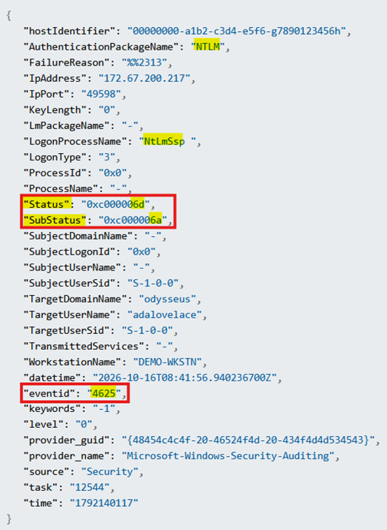
In the example above:
Status: 0xc000006d
SubStatus: 0xc000006a
These typically indicate:
Status = Username is correct
SubStatus = Password is incorrect
“
When this occurs repeatedly over a short time frame, security teams often immediately think: “Someone keeps entering the wrong password.” But another explanation is often more likely.
Why Services and Background Processes Generate These Events
A common scenario occurs after a user changes their password. The user signs into Windows successfully using the new password.
However, one or more background components may still be attempting authentication using the old password:
Examples
- Mapped Network Drives
A mapped drive reconnects automatically at sign-in and attempts to authenticate using stored credentials.
- Scheduled Tasks
A scheduled task configured with a service account or user account may still contain an outdated password.
- Applications
Business applications often cache credentials and periodically reauthenticate.
- Windows Services
Services configured to run under a domain account may continue attempting authentication until credentials are updated.
- Credential Manager Entries
Stored credentials can persist long after a password change.
Why the Events Occur Seconds Apart
Customers often notice a pattern like:
08:41:56
08:41:57
08:41:57
08:41:58
08:41:58
…
This timing is an important clue. Human interaction rarely produces authentication attempts at machine speed. By contrast, services and automated processes can issue multiple authentication requests almost instantaneously as they attempt to:
- Reconnect resources
- Refresh sessions
- Access network shares
- Restart services
- Retry failed connections
The rapid succession of events is often more indicative of automation than a person repeatedly typing passwords.
Could It Still Be Malicious?
Absolutely. One of the biggest mistakes security teams can make is assuming all service-related authentication failures are harmless.
Attackers frequently abuse:
- Service accounts
- Scheduled tasks
- NTLM authentication
- Network logons
- Stored credentials
- Legacy application integrations
A true brute-force attack can generate logs that initially resemble legitimate service activity.
This is why analysts should examine:
- Source hosts
- User behaviour history
- Asset ownership
- Authentication patterns
- Frequency of occurrence
- Related security events
The goal is not to dismiss Event ID 4625 alerts, but to properly contextualize them.
Tuning SIEM Rules: Proceed with Caution
Once an organization identifies recurring false positives, the natural question becomes “Can we just suppress these logs?” Technically, yes. Operationally, it is not always advisable.
Organizations can often build more granular detection logic using criteria such as:
- Specific service accounts
- Known applications
- Logon type values
- Host-specific patterns
- Authentication package details
- Known maintenance activities
However, completely excluding events from ingestion should be approached cautiously.
Risks of Filtering at Ingestion
When logs are discarded before reaching the SIEM:
- Historical evidence is lost
- Threat hunting visibility is reduced
- Future investigations may be impacted
- New attack techniques leveraging the same event type may go unnoticed
- Compliance and audit requirements may not be met
For many organizations, particularly those operating under regulatory obligations in the EU, retaining security telemetry is often preferable to permanently removing it from collection.
A Better Approach: Automated Triage
Instead of suppressing Event ID 4625 entirely, consider implementing a playbook-driven approach.
Examples include:
- Automatically enriching the alert with asset ownership data
- Identifying whether the source host is known
- Checking whether the account recently changed passwords
- Looking for associated service configurations
- Correlating against prior occurrences of the same pattern
This allows analysts to quickly classify recurring benign activity while preserving the audit trail.
Key Takeaways
When investigating Event ID 4625:
- Each event represents an authentication attempt, not necessarily a user-entered password.
- Multiple failures followed by a success are not automatically indicative of brute-force activity.
- Background services, scheduled tasks, mapped drives, and cached credentials commonly generate repeated authentication failures.
- Timing matters: events occurring seconds apart often suggest automation rather than human interaction.
- Still validate the context carefully; legitimate services can be abused by attackers.
- Consider enrichment and automated triage before completely filtering security logs from ingestion.
Final Thoughts
Event ID 4625 remains one of the most valuable Windows security events for detecting credential attacks. At the same time, it is also one of the most misunderstood. A sequence of twenty-five failed logons followed by one successful logon may look alarming, but the underlying cause is often a benign background process attempting to authenticate with outdated or cached credentials.
The key for defenders is context. Understanding who initiated the authentication, where it originated, how it occurred, and which failure codes were recorded transforms Event ID 4625 from a noisy alert source into a highly effective security signal.
The challenge is not simply counting failures but determining whether those failures represent an attacker guessing passwords or a perfectly legitimate process doing exactly what it was configured to do.
How CommSec helps
CommSec’s 24×7 Managed SOC triages alerts like these every day, using enrichment and context to separate real attacks from background noise, so your team only hears about what matters. As far as we know, we are the only Irish indigenous SOC staffed exclusively by people in Ireland. If repeated 4625 alerts are draining your team’s time, talk to us about your detection rules.
About the author
Isabella Sparks is a SOC Analyst in CommSec’s 24×7 Managed Security Operations Centre in Dublin. She investigates and triages security alerts for CommSec clients across Ireland and the EU.
Frequently asked questions
What does Windows Event ID 4625 mean?
Event ID 4625 is the Windows Security log event “An account failed to log on”. Windows records it whenever an authentication attempt fails, whether a person, a service, a scheduled task or an application made the attempt.
Does Event ID 4625 always mean a brute-force attack?
No. Repeated 4625 events, even followed by a successful logon, are often caused by background processes using an old or cached password. Analysts confirm the cause by checking the Logon Type, Status and SubStatus codes, the source host, the timing and the account history.
What do Status 0xC000006D and SubStatus 0xC000006A mean?
Status 0xC000006D is a generic logon failure, caused by a bad user name or bad authentication information. SubStatus 0xC000006A narrows it down: the user name is valid, but the password is wrong.
What is Logon Type 3 in Event ID 4625?
Logon Type 3 is a network logon. It occurs when an account authenticates to a remote resource such as a file share, a mapped drive or a network service, rather than at the keyboard of the machine.
Why do failed logons appear after a password change?
After a password change, mapped drives, scheduled tasks, Windows services, applications and Credential Manager entries can keep trying the old password. Each attempt generates a 4625 event, often several per second, until the stored credentials are updated.
Should we filter Event ID 4625 out of our SIEM?
Usually not. Filtering at ingestion removes evidence needed for threat hunting, investigations and compliance with frameworks such as NIS2 and DORA. Enrichment, tuned detection logic and automated triage reduce noise while preserving the audit trail.